Home Server

So years ago, I had a Windows Home Server setup. (its in the archives here, but I haven’t dug up the link)

I was reasonably happy with it, except that:

  1. Microsoft Discontinued it, and thus almost no updates
  2. It would sometimes crash and need a reboot
  3. The client machines (aka the ones I really wanted back up, and the whole point of having the sever) never actually popped alerts to let me know “hey I haven’t been able to reach the server for three weeks now…”


After about my third multi-month backup blackout. I realized I needed to bite the bullet and tackle something different. I really wanted something that would be a drop-in replacement for WHS, with semi-automated backups and some sort of NAS shared drive options.

The best match I could find was Amahi a Fedora biased Linux solution. I figured the fact that they were selling subscriptions meant there was some incentive for them to stick around and continue to provide updates. It is billed as a really simple solution, and probably is… if you can resist the temptation to tinker with things.

So to save the time it would take to recount the saga of hammering out the wrinkles I created for myself getting things exactly how I wanted it, let’s just say I probably would have been better off doing this thing from scratch. I am by no means a professional Linux admin, but my current job has me logged into several headless boxes each day putting me somewhere near the classic “I know enough to be dangerous” territory.

That being said, I build this thing using Amahi, and it’s a good starting point. I just put the final piece in place today, giving me what for our family in 2017 is a perfect solution to our server needs (because every family has server needs right?)

  • Both PCs automatically sync pictures with the server in near real-time (using a three peer Syncthing  setup)
  • Both PCs do nightly snapshot backups to the server ( If I were doing posts more often there would be several documenting the trials necessary to get that going)
  • Both our phones dump new pictures into the PC photo pool nightly ( Thanks to the Plex mobile client )
  • Our collection of child oriented video can be selectively steamed or loaded onto a phone or tablet on demand

The only real gaps are cloud backup, but I have that configured from one of the PCs and hope that the mirroring of photos between each system ensured that we have everything that’s important in on several local boxes, plus the cloud.

I could go on about the setup… there are endless details to brag about or bemoan, but this will have to suffice as a point-in-time of the state of servers and photo backup at the Nelson household.

-Jordan
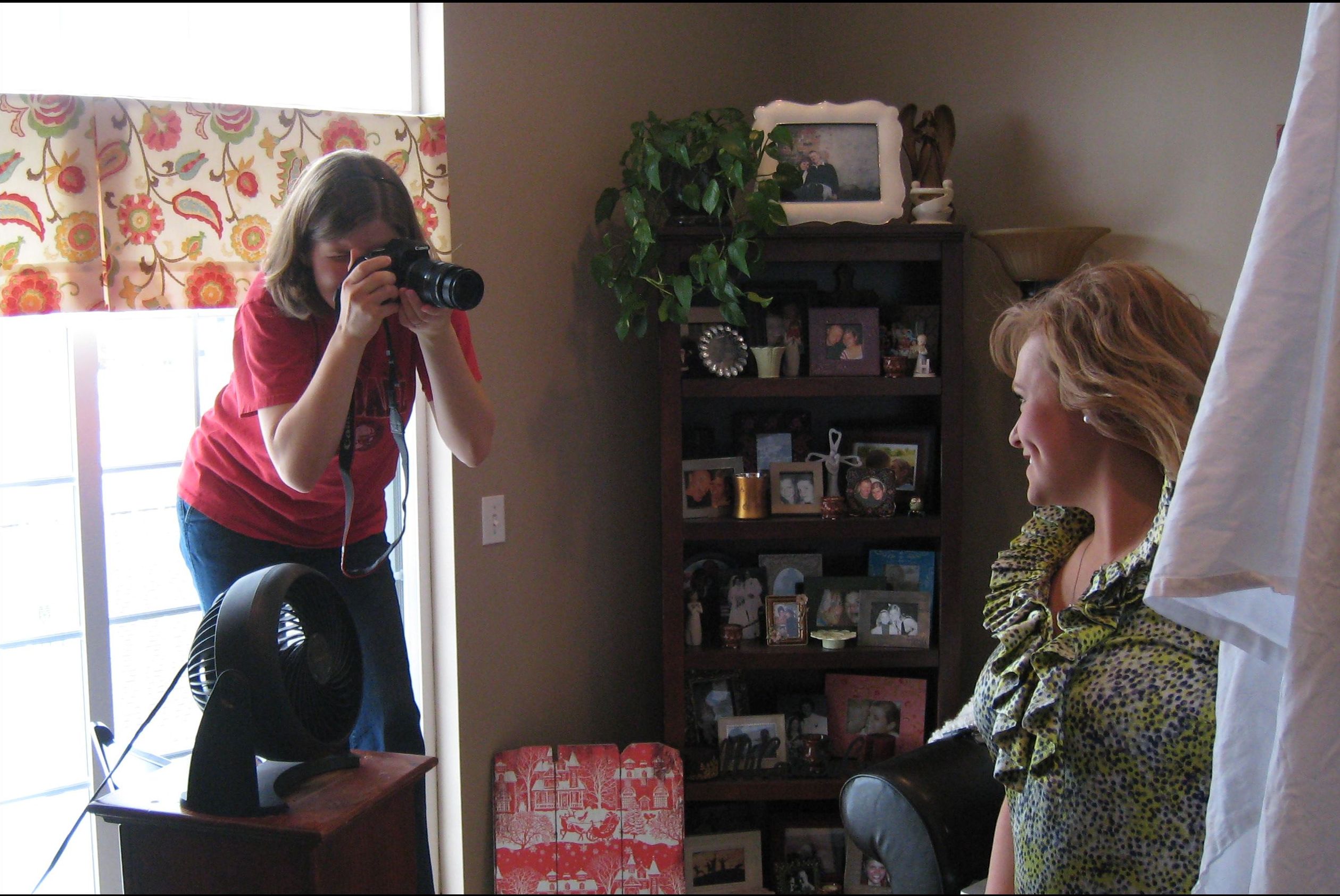
Photo Sync… Again

Back in the early days of this blog, shortly after the wedding in fact, I talked about the problem of keeping picture collections in sync. At the time I settled on SyncToy, a little utility released by Microsoft. It has worked fairly well over the years, but not without some shortcomings.

The two that have continually tripped me up are first the fact that it needs to be run as a scheduled task, and some how the power management on the laptop always walks on my schedule, and two, Picasa gets a little cute with hidden files and “unsaved changes” being tucked away in different folders.

The first problem is fixable, except I have fought with it off and on for years, and find it tedious at this point.

The second could perhaps be solved by letting SyncToy grab the hidden files along with the remaining pictures, but after a few really messy “edit on both machines then wipe out one set of changes” problems I don’t think letting those kinds of things resolve in an overnight batch environment is a good idea.

With that in mind, I was rather excited to hear a discussion of BitTorrent Sync in a recent Security Now podcast. It may not actually be the ideal solution, but I don’t feel that I have time to really research my options right now, and it has been really fun to setup and play with! The tool is built to keep folders in sync anywhere on the web, but works just fine inside a local network.

The configuration is perhaps a little more technical than I would like, but after a few missteps I think I have something that will work, and work within seconds of changes happening on one machine. Given the “magic” that Picasa does using hidden files and folders, what I appear to have created is an instance where Picasa acts like a single installation across both machines. Albums, favorites, and edits are mirrored immediately to the second machine. It may lead to a terrible disaster were we ever to attempt to use the application in both places at the same time, but I don’t see that as a significant risk.

Do Your Backups Work?

I mentioned a few posts ago (we won’t talk about time between posts) that I was setting up a cloud backup solution.

I also still run local backups to a Windows Home Server setup.

A week or so ago, Heather mentioned that some of the pictures were missing from her laptop. I started looking, and discovered to my horror, that all the pictures were missing. 30+ gigs of pictures, carefully sorted and edited, all gone.

I still haven’t been able to determine what happened. The is no evidence that the drive failed, and I can’t quite imagine a drive failing with such precision that only the pictures, and yet all the pictures vanished overnight.

Whatever the cause, my first priority was to see what could be done to restore the pictures. I have a process in place that is suppose to use Microsoft’s SyncToy to replicate all the pictures from the laptop to a shared space on the server and then onto my desktop. However, the scheduling has been broken on the laptop for some time, and I had neglected to fix it*.

This would be my first attempt at restoring files from a Windows Home Server backup. Kind of surprising given that I have had the server running for the entire time we have been married. The restoration options are surprisingly good. I was expecting to have to blindly pick a nightly backup and overwrite the entire laptop with said image. While that is an option, they provide a file browser that lets you examine files in each nightly image. From there you can copy the files to an arbitrary location (even a different computer!) rather than simply restoring them to the location they were backed up from.

This let me recover a few key items, and place them on my desktop, letting Heather work with them while I ran some tests in search of the root cause of these issues.

Failing to find a root issue, I opted to restore the entire pictures collection and move on. It isn’t a fast operation given the sheer size of the collection, and was a nice reminder as to why I keep an Ethernet cable plugged into the router and coiled in the closet… at least I didn’t have to work at wireless speeds… and it still took a long time.

Even having taken a long time, it was remarkable how painless the restoration was compared to what I was dreading. I managed to have 100% of the files recovered within a few hours of discovering the problem. I would conclude this post with a hearty endorsement of Windows Home Server, but Microsoft discontinued the product at the end of last year, so… I guess it’s nice to know it still works.

-Jordan


*Suddenly that seems more serious, although I fear it would have simply synchronized the deletion of pictures through the pipeline rather than restoring the missing pictures. At this point I am afraid to turn it back on until I understand why the pictures vanished in the first place.

Cloud Backup

After having brought Hannah home, and taking a few pictures to prove it, I started to worry, as I am sure many new parents have… “Are my backups good enough?” “Should I be doing offsite backups?” “How am I going to be able to accommodate the sheer volume of digital media being produced here?”

As luck would have it, I happened to be catching up on my Security Now podcasts, and a solution was mentioned that sounded ideal.

CloudBerry is a program that manages archives on a number of 3rd party storage solutions, and allows you to compress and encrypt data before shipping it off to be saved. That wouldn’t be revolutionary, except they have good support for Amazon Glacier.

Glacier is a very low-cost backup option, that was designed with backup in mind, meaning they don’t really expect you to need the data, and you agree that you could be waiting a few hours after your request before they give you access.

Being low-cost was key for our situation, as we have discovered that the appearance of a new baby in our lives sucks up *all* projecting time. That means the “delete extra photos so the backups aren’t huge” project will not be getting done any time soon.

I haven’t actually completed a backup yet… pushing 50+ gigs up to the cloud over our feeble internet connection takes some time, but I am very excited to have found something that appears to meet our needs and won’t cost a small fortune to accommodate the dismaying magnitude of disk space consumed by photos within our network.

-Jordan

Winter Weekend Inside

We had the kind of grey, hard, cold, cloudy, weekends that makes you want to stay inside forever. Fortunately, Heather had invited a friend over for the weekend, so we still had something to brighten the day.

Given the options, Heather and Elise decided to work up some new head-shots that Elise would use to help promote her vocal music aspirations. After a fair amount of re-arranging furniture and trying different  approaches, they managed to pull together a studio of sorts.

We are really lacking when it comes to indoor lighting for photography, but even on a grey day, the south-facing windows pick up enough to let Heather get something done. While we don’t have lighting, we have sheets and a fan…apparently all vital equipment.

As funny as the makeshift studio looked, it’s hard to argue with the results:

And what was I doing throughout all this you ask?

Well, a week or so back I broke down and ordered a desktop computer from the Dell factory outlet. It was really rough on my pride to buy a pre-built machine, but I just couldn’t match the price they were offering. So, I spent most of the day setting up the new machine and fussing with it.

I think everyone had a good day 🙂


-Jordan

Phone Review

It isn’t like we haven’t done things worthy of blogging about, but I decided I wanted to write down my thoughts on the new phone while it was still kind of new.

First off, what is it: Motorola Droid 2

Touch screen, with a slide-out physical keyboard.

More raw processing power than the computer I so proudly took with me to college 10 years ago. Has more storage space too.

As a phone it works as well as any other phone I have owned.

Beyond being a phone it is little portable computer, complete with internet, GPS and a camera. This let’s it do a lot of things, that don’t seem particularly novel to me right now, but would have been mind-blowing just a few years ago.

Speaking of the GPS and camera… The camera is quite good. Not quite as responsive as my point-and-shoot, making quick snapshots impossible. On the other hand, the quality is more or less on-par, and I always have it with me. Having a camera with you is one of the first steps to actually taking pictures! The GPS is more than functional, but in most applications requires that the screen be lit at the same time you are using it. Running both the screen and the GPS eats the battery in a shockingly short amount of time. This isn’t a limitation when using the phone as an in-car navigation device, as long as I packed a charger, but it means the phone isn’t going to provide constant aid in navigating an all-day hike. To put it bluntly I would guess the phone life when displaying a map and my position is between two and three hours. I did however discover in rare applications when you don’t need the screen on and only want passive monitoring the battery life is much better! Running a tracking tool for recording bike rides only drained about 10% of the battery life in around an hour and a half.

Hmm, so I didn’t even manage to describe all the features without some editorializing… something I have been fighting every time I thought about writing this post.

The problem is, I feel like I need to be using the phone all the time to make it seem like it’s worth it. I know that isn’t really true… but it’s kind of the thought floating around behind anything else I think about the phone. I imagine that will fade, and I can already tell you it would be hard to go back to my old phone (even if it were still working properly)

TL;DR: Great phone, can’t say I *needed* it, but it’s really useful now that I have it.

-Jordan

New Laptop!

As you probably recall, the laptop that Heather had when we got married is in the process of dying.

I have been watching for sales on laptops fairly closely, and finally found one. Amazon had an Acer Aspire 5251 for under $400 shipped.

I realize Acer isn’t really on the good end of the reliability spectrum that I linked before, but when you consider price and features in the equation, I felt like a little failure risk was acceptable.

I was going to post a picture, but … well you know what a laptop looks like.

We have actually had the laptop for a few days now, but I just finally finished doing all the setup today. Acer didn’t load the machine down with as many junk applications as HP did, but there was still a little more junk installed than I would like.

This is my first brush with Windows 7. I have absolutely zero complaints so far. The old HP laptop was painfully slow to do basically anything, despite having a passably beefy CPU under the hood (it was on the low end of desktop-replacement-class laptops, with the heft to prove it)  This new machine is wonderfully snappy!

We haven’t had a chance to use it much, but so far the slightly smaller screen doesn’t seem to be that noticeable.

I think we are going to enjoy the fact that the battery life is longer than 15 minutes. Granted, that isn’t really HP’s fault so much as what happens to battery packs when they age, but it sill makes the new laptop seem pretty nice.

I wish I could think of more to say… I am really excited about having it, but laptops do end up being somewhat generic. … “Yay a computer, it does computer-type things!”

Hope you are enjoying your weekend!

-Jordan

Laptop Problems

A few days ago, Heather’s laptop suddenly didn’t have a wireless ethernet adapter.

That was rather interesting,  mostly because the adapter is built-in so I didn’t expect it to go missing. A few minutes of tweaking and poking around convinced me that this really was happening, so I got online to see what I could find.

Turns out, this is a known issue with that model laptop. For reasons unknown to me, Hewlett-Packard decided that starting in 2010, even though this is caused by a known defect, they won’t fix it for free. If this would have happened a year ago, we would perhaps have been better off.  Somehow heat causes damage to the motherboard, eventually causing the wireless to die. My research indicates this damage will continue to spread across the motherboard eventually killing the sound and video as well.

The Hewlett-Packard tech on the phone helpfully offered to repair the three-year-old laptop for $450… quite a bit more than the laptop is worth. When I pointed that out, he managed to find a $200 discount  laying around somewhere. I was actually starting to think that maybe the repair would be such a bad option, even being three years old, it still surfs the internet without any problems. Then he informed me that the motherboard replacement came with a complementary drive-wipe.

Let me explain something here… there is ZERO reason for that! I suppose someone in their tech support staff realized that, without some preventive maintenance, computers start to get slower over time just to accumulated stuff. Our laptop does not have that problem. And speaking as a member of the technical support community (in a loose sense) I would rather people retained all their data instead of saying “whoa, this computer is so much faster after HP worked on it!” It makes me so sad whenever I hear people talk about loosing thousands of pictures thanks to the tech support people just nuking their machine and starting over. … and I better stop on that tangent or I will turn this into a 2000 word rant…

All of that being said, we can’t really live with the laptop being a wired-only model, because we already know its just a matter of time before it dies.

I have started looking into new laptops, and thought I should share this little chart. Notice who is on the “fail” end of the graph? Yeah… I wasn’t too happy with HP going into this process, and then seeing that (technically again, it was published in November) I realized there might be a reason for it.

The downside is that the $250 repair cost is not going to buy a one-to-one replacement for that behemoth of a laptop. All of my frugal living enthusiasm kind of points to doing the repair anyway. I am honestly still torn about that. The thing is, a three-year-old laptop is knocking on deaths door anyway, so patching it up isn’t a great use of money. The batter life is down to maybe 20 minutes unplugged, and will only continue to decay I am sure. That alone kind of makes the wireless connection issue silly… you have to keep it plugged into the wall just to use it with our without a wireless connection.

Stay tuned, it is only a matter of time before some sort of replacement is selected. (and it will be posted here, because… really I don’t always have that much to talk about)

-Jordan

A Few Links

Heather and I just wrapped up a HUGE weekend, and I can’t wait to post about it, but I just don’t have the time / energy right now!

Teaser: we drove over 1000 miles

In the mean time, add one of these to my Christmas list: Quadrotor UAV

Also I wanted to share a cool little application I found out about as of late, called Launchy

It pops up a launcher when I press “ALT + Space” that I can start typing the name of the application I want into and then within a few letters I generally have the program I want right there ready to go. It is so much faster than picking through three or four levels of a cascade menu in Windows!

For example, I wanted the calculator,

Using the mouse it is:

Take right hand off keyboard, find mouse, click: Start->All Programs->Accessories->Calculator

Using Launchy:

Press “ALT + Space”, type “cal” hit enter

As far as I know it works fine in Vista and Win7, but I am still living in the XP era here… I guess I could load it on Heather’s laptop… maybe I will update this later.

Stay tuned, hopefully I will have the real weekend post up shortly 🙂

-Jordan

Video Codec Pain

Heather, for some time now, has been saying that she wanted us to have a simple video camera to record little parts of our lives.

After some quick research I grabbed an older model Vado HD that was cheap, and looked like it would be easy to use.

It has turned out to be really easy to use, and Heather and I have enjoyed getting to play with it. Last night however, I wanted to actually work with a video we had recorded. When I say work with, I mean I wanted to load the video into an editor and you know… edit it. I am not an expert with video editing tools, but that is a post for another day. What I discovered is that the codec (Video Encoding) was some goofy custom thing that none of the editing tools I had access to could work with. To make things worse, none of the variety of video conversion tools I had were able to convert it to a more palatable format.

After a few hours of grief, I think the secret was to install the video editing package that came with the camera, and somehow that dropped a second “edit mode” codec into the registry, letting STOIK open the video to re-sample it. I should not that I still cannot open the native off-the camera video in an editor. Being able to open the video with STOIK means I don’t really care, I just have to convert to an edit-friendly format before starting work.

I would like to be angry at Creative Labs for picking such a weird, unsupported codec for their camera, however I am painfully aware how complicated the job of a codec can be. Complicated means expensive in this case, all the nice easy-to-use codecs are not cheap, and must be licensed. I feel like by buying a cheaper camera I kind of asked to deal with this mess.

On the bright side, I have a workable system to convert video to something I can use. Probably not much chance Heather can do it solo, but she has no problem using the camera. I can live with having to do the imports myself.

-Jordan