Internet… Sorta

Heather and I have been in Iowa for almost a week now, and I have internet connected to the house finally!

The only problem is that we are currently getting roughly 6% of the 7MBPS Qwest promised us.

The almost dead connection makes being online fairly frustrating… I guess I will be spending some time on the phone with tech support here soon!

************ Update ****************

After 30+ minutes on the phone with Qwest, it was discovered that I had plugged into the wrong port on the modem. I don’t quite know how the modem was even working int he state I had it in. It doesn’t make me feel any less dumb for having hooked the modem up wrong 😦

-Jordan

Windows Media Center Movie Project

This is going to be kind of technical, but I have to document the process somewhere….

I have a Windows Media Center PC, hooked to our TV. We don’t have cable, so its not acting as a DVR. I have been planning to setup a plugin called “My Movies” that does a nice graphical browser of all movies stored on a Windows Home Server box, which I happen to have.

I actually had most of this setup months ago, but had run into some problems coping movies to the server. My motivation for all of this is the fact that Heather owns *hundreds* of DVDs. To save space we threw out the cases, and put all the disks into a book. The problem is, its hard to even remember what the movie is about sometimes if they have a generic printing on the disk. The My Movies plugin gives you a picture of the box, and a synopsis, as well as actor list, etc. All really cool, but it was being stubborn about working.

First let me outline the problem:

  • My Movies is a free* tool that will do everything I mentioned before, and auto-add any movie placed in a folder it is watching.
  • It also provides hooks to copy movies using AnyDVD.
  • AnyDVD is kind of expensive for a hobby project of questionable long-term value.
  • there are a number of other cheaper tools that do the same thing as AnyDVD, ranging all the way down to free
  • none of these tools seem to work with My Movies, in the sense that you can just hit the “copy” button
  • I am starting to suspect the My Movies people did this on purpose, as there is no discernible reason the other tools wouldn’t work the same way.
  • Trying to find a work-around was painful, as nobody wants to host the entire tool-set to go from factory DVD to playable files on your hard drive, lest the incur the wrath of the MPAA

After something like 12-18 hours of fussing with it, I finally found a system that’s working. I did have one DVD fail to read so far. I have some ideas for that, but I will come back to it after I have worked through the majority of our library.

The system that works:

  • have dvd43 running, this will allow other applications to read the disk
  • use dvd ShrinkΒ  “backup” option to re sample the disk, set the target folder as the movies folder on the server

I think that I may be able to use “superDVDRipper” to get a usable video out of the one disk DVDshrink failed to read, but its slow and kind of finicky… so I will deal with that later.

-Jordan

Decorating

Heather claims that we are *done* decorating the apartment now. That statement comes with the implicit disclaimer that once she gets wedding pictures ordered, we will get to take down all the frames on the walls and load them with new pictures.

Not to say that I dislike the decorations we have, or even minded putting them all up, I just didn’t realize we needed so many.

decorating

That’s me, hanging one of a number of stars we just recently added to the walls in our bedroom. The decorations look good now, and will look great once we have pictures of people we actually know in the frames! πŸ™‚

As of this past weekend, I finally found a home for every last wedding present. The weekend before that, I spent a fair amount of time hiding cables and computers. Before I got married I honestly couldn’t think of a reason you wouldn’t want over-sized computer cases, and who cares what color they are, as long as they have good airflow and the internal layout is easy to work with. As it turns out, huge blue glowing PC towers are offensive to the apartment decor. Also, the idea of CAT-5 cable running to all corners of the apartment was a tough sell, I did manage to hide it pretty well. Maybe Heather is just graciously ignoring it…. I wont ask πŸ™‚

I am still trying to track down a replacement TV connector for an NVIDIA 7800, and our media center will be hooked up and running on the TV. Heather has the decorations looking amazing, sans pictures, and we don’t have huge piles of sutff in the corners! It seems like we should have people over to visit just to see how nice it is now, but a two bedroom apartment can get pretty crowded… So I won’t invite everyone over at once πŸ™‚

-Jordan

Tech Notes

I have been looking into all kinds of data synchronization tools as of late. My primary goal has been to ensure downloading a camera onto one computer in the house would result in the pictures being available to the other computers.

In my looking around I found Live Mesh Not really the tool I was looking for, because it keeps a copy of the files on an online server. I am really excited about using Mesh to keep a folder synced between my work machine and home for keeping notes handy, getting pictures where I can grab them for blog posts, etc.

Back to the home network, my primary tool is SyncToy. It’s not the most user-friendly tool, so I don’t think Heather will adopt it as something she manually uses, but I have been able to schedule sync jobs from my machine. I hope to have Heather’s Vista laptop doing the same soon. There is a rather large side project involved, where I get to manually merge two huge photo collections before I can actually turn this thing loose with live data.

I turned WinRar loose on Heather’s primary picture collection (there is another one of pre-college pictures), and after a little over an hour of compressing, the .rar was roughly six gigs. That’s just the backup in case something horrible happens when I start merging pictures later this week…

Once that is all up and running, I think there are some cool Windows Home Server plugins that would do web-albums with a lot less hassle than what I am running on this website. I will have to look into that. Not to say its really hard to use Gallery… no I take that back… I don’t find it hard, Heather always gives up because it takes a lot of fiddling with things to make it play nice when you are setting things up or adding pictures. Here’s hoping the WHS plugin will be nicer πŸ™‚

-Jordan

The Media Server

This isn’t probably the most interesting post I could put up, but I still haven’t pulled the pictures off my camera of Heather’s project πŸ™‚

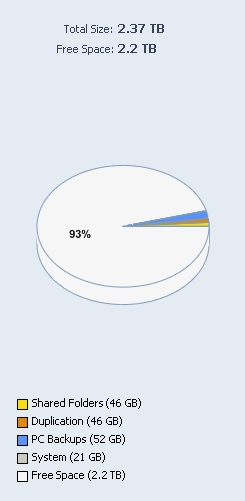
I have a Windows Home Server running in our apartment! I had planned on it just being large network storage location, and knew the Windows Home Server setup let you do a few cool things. As it turns out its really amazing what it can do, automatic imaging of entire computers for one thing! I haven’t really had time to get it fully configured yet, but I have been really excited about it so far.

now for a little bragging:

server_space

2.37 terabytes! Chances are I will find a way to outgrow that somehow, but it will take a while πŸ™‚ For now the only things setting on the drive are the daily images of Heather’s laptop,Β  a few MP3s and all the pictures I wanted to backup off my computer.

It looks like I will be able to map a drive from both Heather’s laptop and my PC to have Picasa work off the server, allowing Heather or I to download our camera once and have the same working set both places, also means a picture edited on one computer will be in the new state for both. I think its going to be really awesome! I may find out Picasa hates working off a network drive, or something like that, but we will cross that bridge when we come to it πŸ™‚

-Jordan

Another Landmark Day

Its now three months until the wedding. October 24th – January 24th… its also 91 days until the wedding if the countdown I have been running is setup correctly. With two major holidays and my birthday in the upcoming months, I have a feeling they will go buy fast.

At the same time I haven’t seen Heather in almost four days, and won’t see her for another two! I know, I know…. we are both spoiled, but it just makes this week seem really long and I wonder what its going to be like once Heather is living in Blair.

In other news, I just found out Left 4 Dead won’t run on my gaming rig. I knew the day a game completely eclipsed my PC with hardware requirements was going to happen sooner or later, I just didn’t expect it quite yet.

Have I mentioned I will be spending my Friday night alone? blah… its just not the greatest day πŸ™‚

-Jordan

New Toys

Heather, for some reason, didn’t want me to bring the huge ugly table I am using for a desk now over to the apartment when I move.

as I mentioned before, we picked up a new desk to replace mine. Its a lot smaller, which would be a problem for my current situation, but Heather also thought I should replace the CRT monitor I have been using. I had sort of been planning to get rid of that monitor for a wile, but it was still working fine, so I couldn’t quite replace it. With Heathers encouragement, I ordered a 24 inch LCD monitor from Newegg.

I have to take a moment and point out how awesome it is to have a fiancee who talked me into buying new stuff for my computer. It makes me smile every time I think about it.

I was a little worried about the monitor as some reviews said things about the color being a little off, or having a lot of dead pixels. Newegg won’t replace a monitor for color temperature issues, and it takes a lot of dead pixels to warrant them replacing the monitor. I un-boxed a shiny new monitor (and it really was shiny) last night, powered it up, and…

No dead pixels!! In addition to the lack of dead pixels, the colors seem true from what I can tell. My only complaint so far is that the stand leans just a little bit. It might just be because the desk isn’t quite level, combined with a little bit of flex in the stand, but one side of the monitor is about 1/4″ above the other. I probably wouldn’t notice that, but its a rather large span so its easier to see.

Actually using it is… interesting, its big enough I don’t feel like I can see it all at once. I am sure I will get used to it. I also realized that I don’t have any video clips hi-res enough to really challenge the monitor, and that my set of desktop images simply wont work when stretched that much. I guess I can’t complain too much, there are worse problems to have πŸ™‚

-Jordan

Wires and cables

With only three weeks remaining until I move out of my current apartment, and having a free night last night, I undertook to reduce some of the computer-parts mess that was in my room. I had one small-ish plastic tub full of things, two extra computer cases with almost functional computers inside, and an entire drawer of my dresser full of wires and spare parts.

** editors note: this is probably not the most interesting thing to read, sorry πŸ™‚ **

I started with the cases, stripping out all the parts that looked useful, wound up with:

  • 3 IDE hard drives of unknown size
  • 6 sticks of PC133 SDRAM of mostly unknown size, a few marked as 128 meg sticks
  • A 16 meg TNT2Β  AGP video card
  • 2 PCI ethernet cards
  • An AGP video card of unknown stats
  • A PCI sound card

After a minute of though I realized nothing was worth the storage space to even salvage… most of that stuff is so far beyond obsolete I couldn’t use it for anything. I suppose somewhere there is someone looking for those parts to keep an old system running, but that’s not me. (and if that person is reading this, price out what $500 will buy you in new hardware, cry, then put in your newegg order)

Then I moved on to the plastic tub, it was mostly full of empty CD cases, converter plugs, case screws, anti-static bags and IDE cables.Β  I have been storing the CD cases from my freshmen year in the dorms as I recall… after 8 years without needing them I think I can part with them. the IDE cables are rapidly becoming useless, but I kept a few. There was some DDR memory in there, but again I have no idea what size the 2 sticks were, or why they are setting there. I have vague memories of mothballing some memory that came out of an unstable system, but I can’t remember if that’s what this is or something else. Couldn’t bring myself to toss the DDR, and the bags of screws will be sticking around, I always wind up needing one or two more than they ship with a new system. (unless of course they always short me on the same kind, and then I just have a huge collection of the wrong screw)

Last, but not least, the drawer full of cables! It turns out I had about 20 basic computer power cables, probably 100 feet of S-Video cable (in 6′ sections), and enough ethernet cable to rewire my entire apartment network 3-4 times. I tossed out all but 2 of the S-Video and power cables, but couldn’t bring myself to part with any ethernet cable (its only been in storage for 1.5 years, I might still need it!)

In the end I managed to compress my entire computer junk storage into the single plastic tub, and threw out well over 50 pounds of computer-related junk.

On reflection, a few notes:

  • Storing more than 2 spares of anything is just silly
  • I need to label things that go into storage
  • Hard drives, even when installed into a PC should have their size and date purchased written on them
  • All driver disks should have a date, and what computer they go to written on them

hopefully I can prevent myself from getting that much stuff piled up again, but at least if it has labels on it, sorting will go faster the next time πŸ™‚

-Jordan