Photo Sync… Again

Back in the early days of this blog, shortly after the wedding in fact, I talked about the problem of keeping picture collections in sync. At the time I settled on SyncToy, a little utility released by Microsoft. It has worked fairly well over the years, but not without some shortcomings.

The two that have continually tripped me up are first the fact that it needs to be run as a scheduled task, and some how the power management on the laptop always walks on my schedule, and two, Picasa gets a little cute with hidden files and “unsaved changes” being tucked away in different folders.

The first problem is fixable, except I have fought with it off and on for years, and find it tedious at this point.

The second could perhaps be solved by letting SyncToy grab the hidden files along with the remaining pictures, but after a few really messy “edit on both machines then wipe out one set of changes” problems I don’t think letting those kinds of things resolve in an overnight batch environment is a good idea.

With that in mind, I was rather excited to hear a discussion of BitTorrent Sync in a recent Security Now podcast. It may not actually be the ideal solution, but I don’t feel that I have time to really research my options right now, and it has been really fun to setup and play with! The tool is built to keep folders in sync anywhere on the web, but works just fine inside a local network.

The configuration is perhaps a little more technical than I would like, but after a few missteps I think I have something that will work, and work within seconds of changes happening on one machine. Given the “magic” that Picasa does using hidden files and folders, what I appear to have created is an instance where Picasa acts like a single installation across both machines. Albums, favorites, and edits are mirrored immediately to the second machine. It may lead to a terrible disaster were we ever to attempt to use the application in both places at the same time, but I don’t see that as a significant risk.

Laptop Problems

A few days ago, Heather’s laptop suddenly didn’t have a wireless ethernet adapter.

That was rather interesting,Β  mostly because the adapter is built-in so I didn’t expect it to go missing. A few minutes of tweaking and poking around convinced me that this really was happening, so I got online to see what I could find.

Turns out, this is a known issue with that model laptop. For reasons unknown to me, Hewlett-Packard decided that starting in 2010, even though this is caused by a known defect, they won’t fix it for free. If this would have happened a year ago, we would perhaps have been better off.Β  Somehow heat causes damage to the motherboard, eventually causing the wireless to die. My research indicates this damage will continue to spread across the motherboard eventually killing the sound and video as well.

The Hewlett-Packard tech on the phone helpfully offered to repair the three-year-old laptop for $450… quite a bit more than the laptop is worth. When I pointed that out, he managed to find a $200 discountΒ  laying around somewhere. I was actually starting to think that maybe the repair would be such a bad option, even being three years old, it still surfs the internet without any problems. Then he informed me that the motherboard replacement came with a complementary drive-wipe.

Let me explain something here… there is ZERO reason for that! I suppose someone in their tech support staff realized that, without some preventive maintenance, computers start to get slower over time just to accumulated stuff. Our laptop does not have that problem. And speaking as a member of the technical support community (in a loose sense) I would rather people retained all their data instead of saying “whoa, this computer is so much faster after HP worked on it!” It makes me so sad whenever I hear people talk about loosing thousands of pictures thanks to the tech support people just nuking their machine and starting over. … and I better stop on that tangent or I will turn this into a 2000 word rant…

All of that being said, we can’t really live with the laptop being a wired-only model, because we already know its just a matter of time before it dies.

I have started looking into new laptops, and thought I should share this little chart. Notice who is on the “fail” end of the graph? Yeah… I wasn’t too happy with HP going into this process, and then seeing that (technically again, it was published in November) I realized there might be a reason for it.

The downside is that the $250 repair cost is not going to buy a one-to-one replacement for that behemoth of a laptop. All of my frugal living enthusiasm kind of points to doing the repair anyway. I am honestly still torn about that. The thing is, a three-year-old laptop is knocking on deaths door anyway, so patching it up isn’t a great use of money. The batter life is down to maybe 20 minutes unplugged, and will only continue to decay I am sure. That alone kind of makes the wireless connection issue silly… you have to keep it plugged into the wall just to use it with our without a wireless connection.

Stay tuned, it is only a matter of time before some sort of replacement is selected. (and it will be posted here, because… really I don’t always have that much to talk about)

-Jordan

Decorating

Heather claims that we are *done* decorating the apartment now. That statement comes with the implicit disclaimer that once she gets wedding pictures ordered, we will get to take down all the frames on the walls and load them with new pictures.

Not to say that I dislike the decorations we have, or even minded putting them all up, I just didn’t realize we needed so many.

decorating

That’s me, hanging one of a number of stars we just recently added to the walls in our bedroom. The decorations look good now, and will look great once we have pictures of people we actually know in the frames! πŸ™‚

As of this past weekend, I finally found a home for every last wedding present. The weekend before that, I spent a fair amount of time hiding cables and computers. Before I got married I honestly couldn’t think of a reason you wouldn’t want over-sized computer cases, and who cares what color they are, as long as they have good airflow and the internal layout is easy to work with. As it turns out, huge blue glowing PC towers are offensive to the apartment decor. Also, the idea of CAT-5 cable running to all corners of the apartment was a tough sell, I did manage to hide it pretty well. Maybe Heather is just graciously ignoring it…. I wont ask πŸ™‚

I am still trying to track down a replacement TV connector for an NVIDIA 7800, and our media center will be hooked up and running on the TV. Heather has the decorations looking amazing, sans pictures, and we don’t have huge piles of sutff in the corners! It seems like we should have people over to visit just to see how nice it is now, but a two bedroom apartment can get pretty crowded… So I won’t invite everyone over at once πŸ™‚

-Jordan

The Media Server

This isn’t probably the most interesting post I could put up, but I still haven’t pulled the pictures off my camera of Heather’s project πŸ™‚

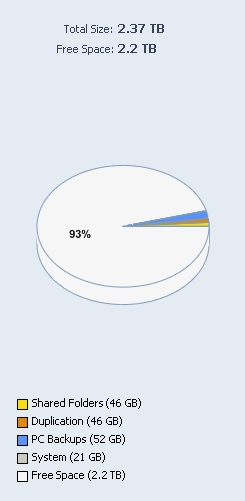
I have a Windows Home Server running in our apartment! I had planned on it just being large network storage location, and knew the Windows Home Server setup let you do a few cool things. As it turns out its really amazing what it can do, automatic imaging of entire computers for one thing! I haven’t really had time to get it fully configured yet, but I have been really excited about it so far.

now for a little bragging:

server_space

2.37 terabytes! Chances are I will find a way to outgrow that somehow, but it will take a while πŸ™‚ For now the only things setting on the drive are the daily images of Heather’s laptop,Β  a few MP3s and all the pictures I wanted to backup off my computer.

It looks like I will be able to map a drive from both Heather’s laptop and my PC to have Picasa work off the server, allowing Heather or I to download our camera once and have the same working set both places, also means a picture edited on one computer will be in the new state for both. I think its going to be really awesome! I may find out Picasa hates working off a network drive, or something like that, but we will cross that bridge when we come to it πŸ™‚

-Jordan

Another Landmark Day

Its now three months until the wedding. October 24th – January 24th… its also 91 days until the wedding if the countdown I have been running is setup correctly. With two major holidays and my birthday in the upcoming months, I have a feeling they will go buy fast.

At the same time I haven’t seen Heather in almost four days, and won’t see her for another two! I know, I know…. we are both spoiled, but it just makes this week seem really long and I wonder what its going to be like once Heather is living in Blair.

In other news, I just found out Left 4 Dead won’t run on my gaming rig. I knew the day a game completely eclipsed my PC with hardware requirements was going to happen sooner or later, I just didn’t expect it quite yet.

Have I mentioned I will be spending my Friday night alone? blah… its just not the greatest day πŸ™‚

-Jordan

Wires and cables

With only three weeks remaining until I move out of my current apartment, and having a free night last night, I undertook to reduce some of the computer-parts mess that was in my room. I had one small-ish plastic tub full of things, two extra computer cases with almost functional computers inside, and an entire drawer of my dresser full of wires and spare parts.

** editors note: this is probably not the most interesting thing to read, sorry πŸ™‚ **

I started with the cases, stripping out all the parts that looked useful, wound up with:

  • 3 IDE hard drives of unknown size
  • 6 sticks of PC133 SDRAM of mostly unknown size, a few marked as 128 meg sticks
  • A 16 meg TNT2Β  AGP video card
  • 2 PCI ethernet cards
  • An AGP video card of unknown stats
  • A PCI sound card

After a minute of though I realized nothing was worth the storage space to even salvage… most of that stuff is so far beyond obsolete I couldn’t use it for anything. I suppose somewhere there is someone looking for those parts to keep an old system running, but that’s not me. (and if that person is reading this, price out what $500 will buy you in new hardware, cry, then put in your newegg order)

Then I moved on to the plastic tub, it was mostly full of empty CD cases, converter plugs, case screws, anti-static bags and IDE cables.Β  I have been storing the CD cases from my freshmen year in the dorms as I recall… after 8 years without needing them I think I can part with them. the IDE cables are rapidly becoming useless, but I kept a few. There was some DDR memory in there, but again I have no idea what size the 2 sticks were, or why they are setting there. I have vague memories of mothballing some memory that came out of an unstable system, but I can’t remember if that’s what this is or something else. Couldn’t bring myself to toss the DDR, and the bags of screws will be sticking around, I always wind up needing one or two more than they ship with a new system. (unless of course they always short me on the same kind, and then I just have a huge collection of the wrong screw)

Last, but not least, the drawer full of cables! It turns out I had about 20 basic computer power cables, probably 100 feet of S-Video cable (in 6′ sections), and enough ethernet cable to rewire my entire apartment network 3-4 times. I tossed out all but 2 of the S-Video and power cables, but couldn’t bring myself to part with any ethernet cable (its only been in storage for 1.5 years, I might still need it!)

In the end I managed to compress my entire computer junk storage into the single plastic tub, and threw out well over 50 pounds of computer-related junk.

On reflection, a few notes:

  • Storing more than 2 spares of anything is just silly
  • I need to label things that go into storage
  • Hard drives, even when installed into a PC should have their size and date purchased written on them
  • All driver disks should have a date, and what computer they go to written on them

hopefully I can prevent myself from getting that much stuff piled up again, but at least if it has labels on it, sorting will go faster the next time πŸ™‚

-Jordan